The Ultimate Collaboration
We’ve traveled across the world researching the best transfer gel & stencil paper pairing for Purple Stencil ink & printers. Now, we’re giving it to you.

Purple Stencil
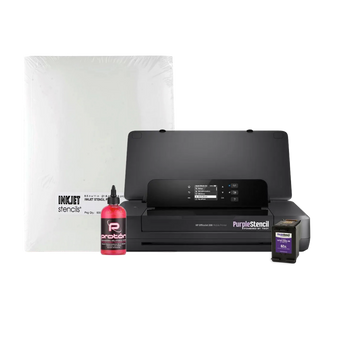
PS-M200 Mobile Tattoo Stencil Printer Bundle
Printer Description
Every part of the Purple Stencil PS-M200 bundle was selected to create the ideal portable stencil setup for artists on the move. The compact mobile printer delivers crisp, high-resolution stencil detail anywhere your work takes you, while our specially formulated Purple Stencil ink bonds cleanly with premium InkJet stencil paper for bold, reliable transfers.
Proton stencil transfer gel completes the system by helping the stencil stay locked in place and transfer evenly onto the skin, even across difficult contours and hard-to-tattoo areas. Together, this mobile-friendly trio delivers sharper stencils, cleaner applications, and a smoother workflow with fewer interruptions whether you’re tattooing in the shop, traveling, or working conventions - experience complete wireless freedom.
This bundle includes a 4ML bottle of Proton stencil transfer gel – a thick, reliable formula that applies firmly to the skin, even with inkjet paper. To round it out, you get a full ream (500 sheets) of 8.5" x 11" Pacon inkjet stencil paper.
At TROY, we are committed to fair and transparent pricing. The following information applies to all pricing displayed in our online store at shop.troygroup.com.
Prices & Transactions: The displayed prices can be viewed globally. However, all prices displayed are only valid within the United States exclusively for transactions completed through our online store. The online store is currently only able to accept transactions within the United States.
Shipping Information: For customers within the Continental U.S., we offer free ground shipping on orders over $150. For customers in Hawaii and Alaska, standard shipping rates apply. For more information about shipping please visit our Shipping Information page.
TROY Group reserves the right to decline orders that do not comply with this policy. This policy may be updated periodically to reflect changes in pricing structure or operational capabilities.
Are you a qualified Tax Exempt Customer?
TROY is currently upgrading our systems to provide a smoother tax-exempt checkout experience. During this transition, tax exemption certificates must be submitted by email before your account can be updated.
To help ensure your online order is tax exempt, please email your state tax exemption certificate to customerservice@troygroup.com before placing your order. Be sure to include the email address associated with your TROY Shop account.
Already placed your order? Please give us a call and our Customer Service Team will review your exemption and assist with removing or refunding applicable tax once verified.
Once verified, your account will be updated so eligible future orders can be processed without tax.
The best way to mark your territory
Tattoo Stencil Triple Threat
Click the + to learn more

Proton Stencil Transfer Gel
The strongest stencil adhesive on the market. Crafted in Spain, fragrance free, and better for sensitive skin.
The Pacon InkJet Stencil Paper Difference
Fully absorbs stencil ink and won’t jam in your printer. When paired with Pacon, stencils can be laid on any part of the body.
Clog Free - Every time
Strong, dark, and long lasting. Formulated in our own in-house lab.
FAQ
Common questions about the PS-M200
Do I need WiFi to print wirelessly?
No network, no problem. Easily print from your laptop or mobile devices using Wi-Fi Direct®. This printer puts out its own WiFi signal wherever you are. So you can print nearly everywhere.
I am worried about paper jams
We recommend printing one stencil sheet at a time if you are having paper jams. If you run into issues printing more than one sheet at a time, simply decrease the print quality in the printer settings.
How is this different than other InkJet Stencil solutions?
The PS-M200 has been specifically designed to be used with our exclusive stencil ink to prevent clogging, smears and leaks.
Is the PS-M200 Mobile Printer a Thermal printer?
This printer uses hybrid Thermal Inkjet technology to produce crisp, clean lines when printing onto Inkjet stencil paper.
Does this printer need to be connected to power?
Plug into an outlet, USB cable, or run directly off battery power. Quickly recharge and go with built in fast charging!
Which type of Stencil paper to use?
The PS-M200 is compatible with popular Inkjet stencil paper brands.